
Creating NL Recurring journals
Transactions – NL
F8 Recurring Journals
F9 New Recurring
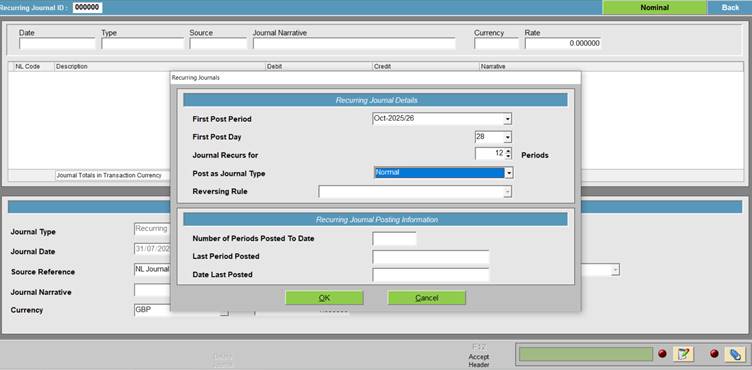
Select the First Posting Period
Select the First Post Day
Select how many period the journal recurs for, if you want to use if for a long time set to 999
Select the Journal type, Normal or Reversing
If Reversing select the Reversing Rule – Create Reversing Journals on Posting, Auto-Reverse at Month-end or Do Not Reverse (Manual Action Required)
Select OK
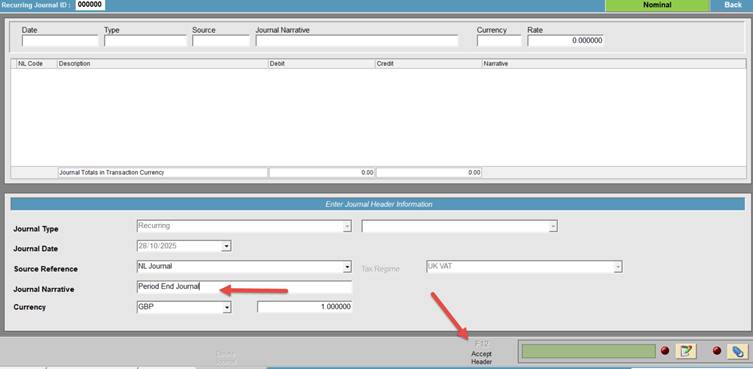
Enter a Journal Narrative
F12 Accept Header
Now enter the NL codes and the amounts you want to post.
If you are going to change the amounts each time you post the journal, enter 0.01 into the Debit or Credit field as you cannot leave this as zero.
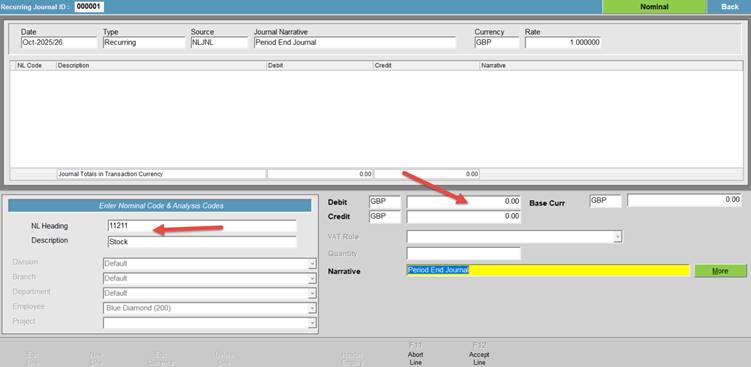
Once you have entered everything, F12 Accept Recurring.
Selecting and Posting Recurring NL Journals
Transactions – NL
F8 Recurring Journals
Highlight the Recurring Journal you want to post and F6 Select Recurring.
F8 Create Journal
The journal will be created and appear in the grid.
You can either select F9 Post Journals
or
F5 Edit Journal if you want to edit the values before posting.